Takes a networkx DiGraph and places queues
on each edge of the graph. The simulations are event based, and
this class handles the scheduling of events.
Each edge on the graph has a type, and this type is used to
specify the subclass of QueueServer and arguments used
when creating the queue that sits on each edge.
Any object that networkx can turn into a
DiGraph. The graph specifies the
network, and the queues sit on top of the edges.
q_classesdict (optional)
Used to specify the QueueServer class for each edge
type. The keys are integers for the edge types, and the values
are classes.
q_argsdict (optional)
Used to specify the class arguments for each type of
QueueServer. The keys are integers for the edge types
and the values are dictionarys holding the arguments that are
passed when instantiating each QueueServer created
with that edge type.
seedint (optional)
An integer used to initialize numpy’s psuedo-random number
generator.
colorsdict (optional)
A dictionary of RGBA colors used to color the graph. The keys
are specified in the Notes section. If this parameter is
supplied but a particular key is missing, then the default
value for that key is used.
max_agentsint (optional, default: 1000)
The maximum number of agents that can be in the network at any
time.
blocking{'BAS','RS'} (optional, default: 'BAS')
Specifies the blocking behavior for the system. If blocking
is not `’RS’,thenitisassumedtobe``'BAS'.
'BAS'
Blocking After Service: when an agent attempts to enter a
LossQueue that is at capacity the agent is forced
to wait at his current queue until an agent departs from
the target queue.
'RS'
Repetitive Service Blocking: when an agent attempts to
enter a LossQueue that is at capacity, the agent
is forced to receive another service from the queue it is
departing from. After the agent receives the service, she
then checks to see if the desired queue is still at
capacity, and if it is this process is repeated, otherwise
she enters the queue.
adjust_graphbool (optional, default: True)
Specifies whether the graph will be adjusted to make sure
terminal nodes do not cause any issues when simulating. For
most cases, this should be set to True.
Raises:
TypeError
Raised when the parameter g is not of a type that can be
made into a networkx.DiGraph, or when g is not
None.
Notes
If only Agents enter the network, then the
QueueNetwork instance is a Jackson network. The default
transition probabilities at any vertex v is
1/g.out_degree(v) for each adjacent vertex.
This class must be initialized before any simulations can take
place. To initialize, call the initialize() method.
When simulating the network, the departure of an agent from one
queue coincides with their arrival to another. There is no time
lag between these events.
When defining your q_classes you should not assign queues
with edge type 0 to anything other than the
NullQueue class. Edges with edge type 0 are
treated by QueueNetwork as terminal edges (edges that point
to a terminal vertex).
If an edge type is used in your network but not given in
q_classes parameter then the defaults are used, which are:
For example, if your network has type 0, 1, and 2
edges but your q_classes parameter looks like:
>>> my_classes={1:qt.ResourceQueue}
then each type 0 and type 2 edge is a NullQueue
and LossQueue respectively.
The following properties are assigned as a node or edge attribute
to the graph; their default values for each edge or node is shown:
vertex_pen_width: 1.1,
vertex_size: 8,
edge_control_points: []
edge_marker_size: 8
edge_pen_width: 1.25
There are also property maps created for graph visualization,
they are vertex_color, vertex_fill_color, pos, and
edge_color. The default colors, which are used by various
methods, are:
Specifies the default queue classes for each edge type.
default_colorsdict
Specifies various default colors.
default_q_colorsdict
Specifies the default colors used by the queues.
in_edgeslist
A mapping between vertex indices and the in-edges at that
vertex. Specifically, in_edges[v] returns a list containing
the edge index for all edges with the head of the edge at
v, where v is the vertex’s index number.
max_agentsint
The maximum number of agents that can be in the network at any
time.
A one-dimensional array where the k-th entry corresponds to
the total number of agents in the QueueServer with
edge index k. This number includes agents that are
scheduled to arrive at the queue at some future time but
haven’t yet.
num_edgesint
The number of edges in the graph.
num_eventsint
The number of events that have occurred thus far. Every arrival
from outside the network counts as one event, but the departure
of an agent from a queue and the arrival of that same agent to
another queue counts as one event.
num_verticesint
The number of vertices in the graph.
num_nodesint
The number of vertices in the graph.
out_edgeslist
A mapping between vertex indices and the out-edges at that
vertex. Specifically, out_edges[v] returns a list
containing the edge index for all edges with the tail of the
edge at v, where v is the vertex’s index number.
Each QueueServer in the network starts inactive,
which means they do not accept arrivals from outside the
network, and they have no agents in their system. This method
sets queues to active, which then allows agents to arrive from
outside the network.
Parameters:
nActiveint (optional, default: 1)
The number of queues to set as active. The queues are
selected randomly.
queuesint array_like (optional)
The edge index (or an iterable of edge indices) identifying
the QueueServer(s) to make active by.
edges2-tuple of int or array_like (optional)
Explicitly specify which queues to make active. Must be
either:
A 2-tuple of the edge’s source and target vertex
indices, or
An iterable of 2-tuples of the edge’s source and
target vertex indices.
edge_typeint or an iterable of int (optional)
A integer, or a collection of integers identifying which
edge types will be set active.
Raises:
ValueError
If queues, egdes, and edge_type are all None
and nActive is an integer less than 1
ValueError is raised.
TypeError
If queues, egdes, and edge_type are all None
and nActive is not an integer then a TypeError
is raised.
QueueingToolError
Raised if all the queues specified are
NullQueues.
Notes
NullQueues cannot be activated, and are
sifted out if they are specified. More specifically, every edge
with edge type 0 is sifted out.
A transition routing matrix or transition dictionary. If
passed a dictionary, the keys are source vertex indices and
the values are dictionaries with target vertex indicies
as the keys and the probabilities of routing from the
source to the target as the values.
Raises:
ValueError
A ValueError is raised if: the keys in the dict
don’t match with a vertex index in the graph; or if the
ndarray is passed with the wrong shape,
must be (num_vertices, num_vertices); or the values
passed are not probabilities (for each vertex they are
positive and sum to 1);
Simulates either a specific number of events or for a specified
amount of simulation time.
Parameters:
nint (optional, default: 1)
The number of events to simulate. If t is not given
then this parameter is used.
tfloat (optional)
The amount of simulation time to simulate forward. If
given, t is used instead of n.
Raises:
QueueingToolError
Will raise a QueueingToolError if the
QueueNetwork has not been initialized. Call
initialize() before calling this method.
Examples
Let net denote your instance of a QueueNetwork. Before
you simulate, you need to initialize the network, which allows
arrivals from outside the network. To initialize with 2 (random
chosen) edges accepting arrivals run:
The transition probabilities for each vertex in the graph.
If out is an ndarray, then
out[v,u] returns the probability of a transition from
vertex v to vertex u. If out is a dict
then out_edge[v][u] is the probability of moving from
vertex v to the vertex u.
What this shows is the following: when an Agent is at
vertex 2 they will transition to vertex 0 with
probability 0.561 and route to vertex 6 probability
0.438, when at vertex 6 they will transition back to
vertex 2 with probability 0.673 and route vertex 4
probability 0.326, etc.
A comma seperated string of the column headers. Returns
'arrival,service,departure,num_queued,num_total,q_id'`
Examples
Data is not collected by default. Before simulating, by sure to
turn it on (as well as initialize the network). The following
returns data from queues with edge_type 1 or 3:
The animations can be saved to disk or viewed in interactive
mode. Closing the window ends the animation if viewed in
interactive mode. This method calls
scatter(), and
LineCollection, and any
keyword arguments they accept can be passed to them.
Parameters:
outstr (optional)
The location where the frames for the images will be saved.
If this parameter is not given, then the animation is shown
in interactive mode.
tfloat (optional)
The amount of simulation time to simulate forward. If
given, and out is given, t is used instead of
n.
line_kwargsdict (optional, default: None)
Any keyword arguments accepted by
LineCollection.
scatter_kwargsdict (optional, default: None)
Any keyword arguments accepted by
scatter().
bgcolorlist (optional, keyword only)
A list with 4 floats representing a RGBA color. The
default is defined in self.colors['bgcolor'].
This method calls
FuncAnimation and
optionally matplotlib.animation.FuncAnimation.save().
Any keyword that can be passed to these functions are
passed via kwargs.
There are several parameters automatically set and passed to
matplotlib’s scatter(),
LineCollection, and
FuncAnimation by default.
These include:
FuncAnimation: Uses the
defaults for that function. Saving the animation is done
by passing the ‘filename’ keyword argument to this method.
This method also accepts any keyword arguments accepted
by save().
This method relies heavily on
QueueNetworkDiGraph.draw_graph(). Also, there is a
parameter that sets the background color of the canvas, which
is the bgcolor parameter.
If you specify a file name and location, the drawing will be
saved to disk. For example, to save the drawing to the current
working directory do the following:
The shade of each edge depicts how many agents are located at
the corresponding queue. The shade of each vertex is determined
by the total number of inbound agents. Although loops are not
visible by default, the vertex that corresponds to a loop shows
how many agents are in that loop.
There are several additional parameters that can be passed –
all QueueNetworkDiGraph.draw_graph() parameters are
valid. For example, to show the edges as dashed lines do the
following.
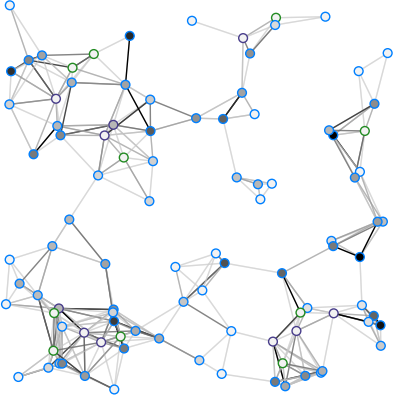
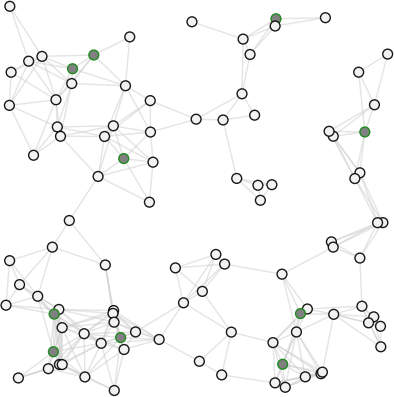
The colored vertices represent vertices that have at least one
queue on an in-edge that is active. Dark edges represent
queues that are active, light edges represent queues that are
inactive.
Active queues are QueueServers that
accept arrivals from outside the network. The colors are
defined by the class attribute colors. The relevant keys
are vertex_active, vertex_inactive, edge_active,
and edge_inactive.
The colors are defined by the class attribute colors. The
relevant colors are vertex_active, vertex_inactive,
vertex_highlight, edge_active, and edge_inactive.
Examples
The following code highlights all edges with edge type 2.
If the edge is a loop then the vertex is highlighted as well.
In this case all edges with edge type 2 happen to be loops.
The attributes t, num_events, num_agents are set to
zero, reset_colors() is called, and the
QueueServer.clear() method is called for each queue in
the network.
Notes
QueueNetwork must be re-initialized before any simulations
can run.